A UI UX Design Course Near Me teaches you how to design websites and mobile apps that are easy to use, visually appealing, and focused on user experience. If you want practical training with industry tools, GICT offers a UI UX Design Course in Delhi that helps beginners build job-ready design skills.
Today, every business wants websites and apps that are simple, attractive, and user-friendly. Therefore, companies hire UI UX designers to create better digital experiences for their customers. Learning UI UX design can help you start a creative career, switch professions, or improve your digital skills.
If you are searching for a UI UX Design Course in Janakpuri, this guide explains what UI UX design is, what you will learn, and why it is one of the fastest-growing career options.
Why Is UI UX Design Important Today?
UI UX design is important because it helps people use websites and mobile apps easily.
A good product is not enough if users cannot understand how to use it. Therefore, businesses invest in UI UX designers who make digital products simple and enjoyable.
Good design improves customer satisfaction. It also increases engagement, builds trust, and helps businesses achieve better results. As a result, skilled UI UX designers are in high demand across many industries.
Where Is UI UX Design Used?
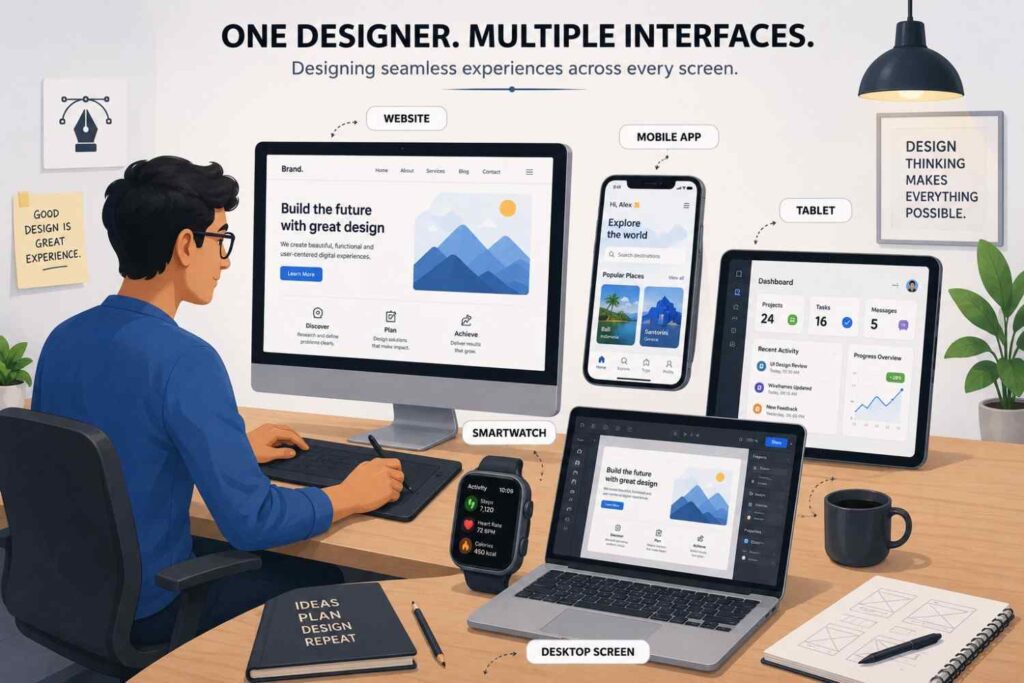
UI UX design is used in almost every digital product.
Some common examples include:
- Mobile apps
- Business websites
- E-commerce websites
- Banking applications
- Food delivery apps
- Healthcare portals
- Learning platforms
- Travel websites
- Dashboard software
- Smart TV applications
Because digital products continue to grow, the need for skilled designers also continues to increase.
What Is UI Design?
UI design is the process of designing the visual appearance of a digital product.
UI stands for User Interface. It includes everything users can see and interact with on a screen. For example, buttons, menus, icons, forms, colors, and typography are all part of UI design.
A good UI makes a product attractive and easy to understand. Therefore, designers carefully choose layouts, spacing, colors, and fonts to create a clean interface.
Common UI Design Elements
UI designers work with elements such as:
- Buttons
- Icons
- Navigation menus
- Colors
- Typography
- Cards
- Forms
- Images
- Illustrations
- Design systems
Each element should work together to create a consistent user interface.
What Is UX Design?
UX design is the process of improving the overall experience users have while using a product.
UX stands for User Experience. Instead of focusing only on appearance, UX designers think about how people interact with a website or app.
A good user experience helps people complete tasks quickly and without confusion. Therefore, UX designers study user behavior before creating solutions.
UX Design Includes
A UX designer works on:
- User research
- User journeys
- Wireframes
- Information architecture
- User flows
- Usability testing
- Problem solving
- Accessibility
- Prototyping
- User feedback
Good UX reduces frustration and increases customer satisfaction.
What Is the Difference Between UI and UX?
UI and UX work together, but they are not the same.
UI focuses on how a product looks. UX focuses on how a product works and feels.
For example, a shopping app may look beautiful. However, if customers cannot find the checkout button, the experience becomes frustrating. Likewise, an app may work well but still look outdated. Therefore, successful products need both UI and UX.
| UI Design | UX Design |
|---|---|
| Focuses on appearance | Focuses on experience |
| Uses colors and typography | Studies user behavior |
| Creates layouts | Solves usability problems |
| Designs visual elements | Improves navigation |
| Makes products attractive | Makes products easier to use |
Both skills are important because they help businesses create products that users enjoy.
Why Should You Join a UI UX Design Course Near Me?
A UI UX Design Course Near Me gives you practical training, industry guidance, and hands-on experience.
Many beginners try learning through random online videos. However, they often miss important concepts and practical exercises. A structured course follows a step-by-step approach that makes learning easier.
Moreover, classroom learning allows you to ask questions, receive feedback, and improve your projects regularly.
Benefits of Learning at a Nearby Institute
Joining a nearby institute offers many advantages.
- Learn from experienced trainers.
- Practice every concept in class.
- Work on real design projects.
- Receive feedback on your designs.
- Improve problem-solving skills.
- Build a professional portfolio.
- Prepare for interviews.
- Stay motivated with classroom learning.
Learning in a classroom also helps you understand design thinking through discussions and teamwork.
What Will You Learn in a UI UX Design Course?
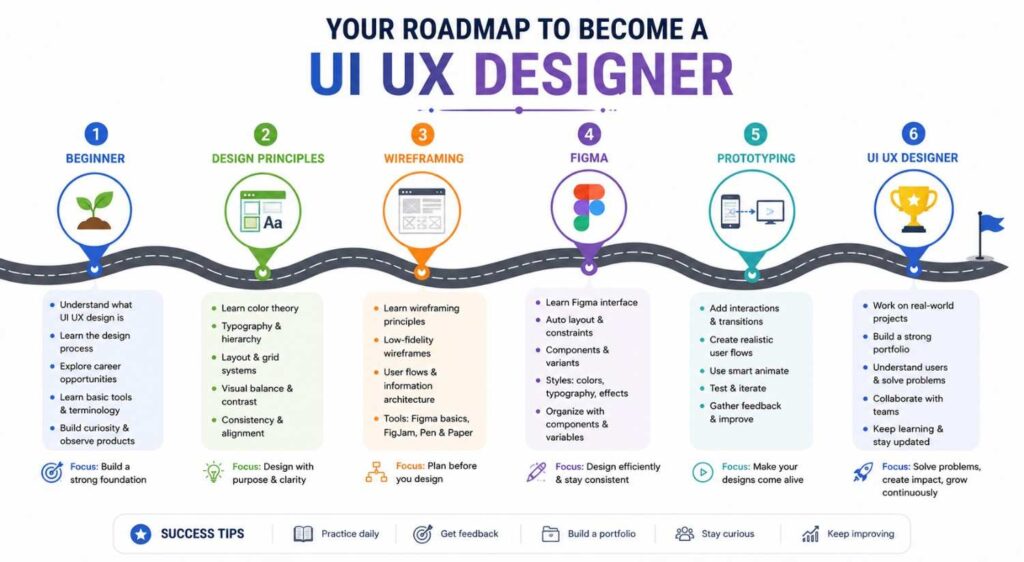
A UI UX Design Course teaches you how to design digital products from research to final prototype.
Instead of learning only software, you also understand design principles and user behavior. As a result, you become capable of creating user-friendly interfaces.
Core Topics Covered
The course generally includes:
- UI design principles
- UX design fundamentals
- Color theory
- Typography
- Layout design
- Design systems
- Wireframing
- Prototyping
- User research
- User personas
- User flows
- Responsive design
- Mobile app design
- Website design
- Accessibility
- Portfolio development
You also complete practical assignments that help you improve your skills throughout the course.
Why Is Figma Important for UI UX Designers?
Figma is one of the most widely used design tools for UI UX design.
Many companies use Figma because it allows teams to design, edit, and collaborate in real time. Therefore, learning Figma is an important part of becoming a UI UX designer.
If you are looking for a Figma Course in Delhi or a Figma Course in Janakpuri, learning Figma together with UI UX design gives you practical skills that employers expect.
What Can You Create in Figma?

You can design:
- Mobile app screens
- Website layouts
- Landing pages
- Dashboards
- Wireframes
- Interactive prototypes
- Design systems
- Components
- Icons
- User interface kits
Figma makes it easier to turn ideas into professional designs.
What Advanced UI UX Skills Will You Learn?
A good UI UX Design Course teaches advanced skills that help you design real digital products.
After learning the basics, you start working on complete design projects. As a result, you understand how professional designers solve real user problems.
You also learn how to organize your work, communicate your ideas, and improve designs based on user feedback.
Advanced Topics Included
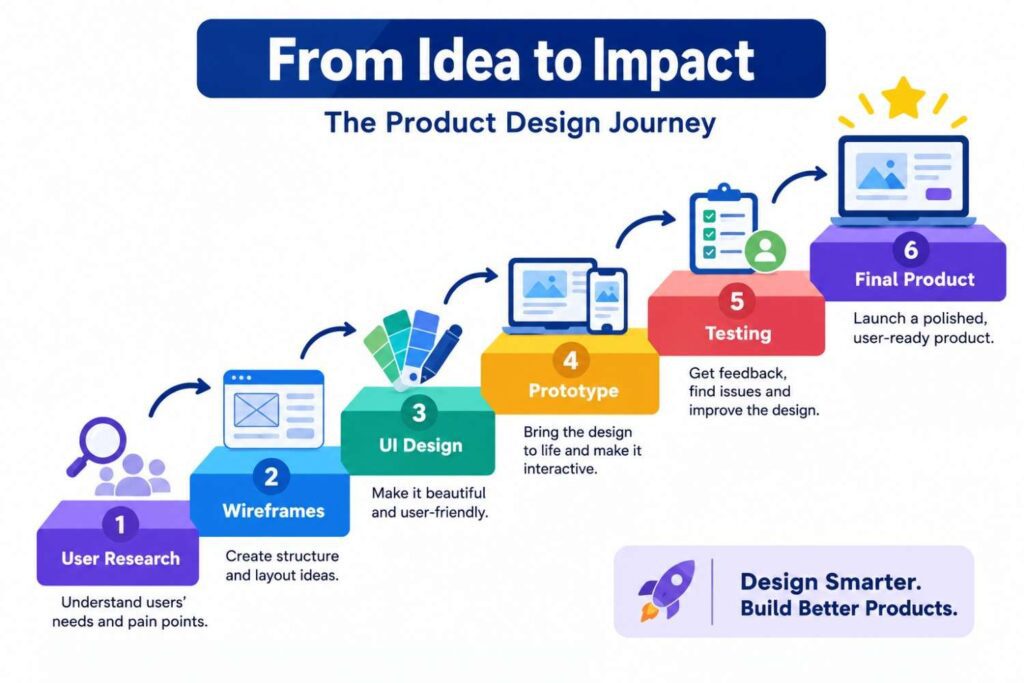
The course covers:
- Design thinking
- User research
- User personas
- User journey mapping
- Information architecture
- Wireframing
- Low-fidelity design
- High-fidelity design
- Interactive prototyping
- Design systems
- Responsive design
- Mobile-first design
- Accessibility
- Portfolio development
These skills prepare you for professional UI UX design projects.
What Is Design Thinking?
Design thinking is a process that helps designers solve problems by understanding users.
Instead of guessing what users want, designers first study their needs. Then, they create ideas, build designs, test them, and improve them.
This approach helps businesses build products that people actually enjoy using.
Steps in Design Thinking
Most UI UX projects follow these steps:
- Understand the users
- Identify the problem
- Generate ideas
- Create wireframes
- Build prototypes
- Test with users
- Improve the design
Because every project is different, designers may repeat these steps several times.
Why Is User Research Important?
User research helps designers understand what people need before creating a design.
Without research, designers often make assumptions that lead to poor user experiences. Therefore, every successful UI UX project starts with research.
Good research also saves time because problems are identified early.
What Will You Learn?
During the course, you will learn how to:
- Identify target users
- Conduct basic interviews
- Create user personas
- Understand user goals
- Study user behavior
- Analyze competitors
- Collect feedback
- Improve designs based on research
These methods help designers make informed decisions instead of relying on guesswork.
What Are Wireframes?
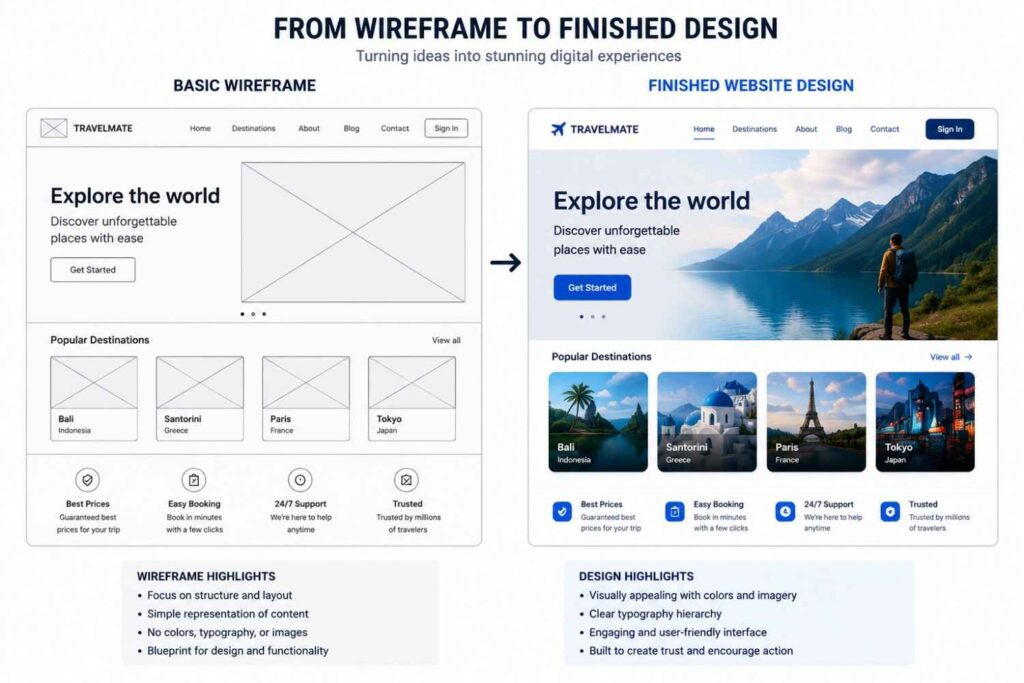
Wireframes are simple layouts that show the structure of a website or mobile app.
They focus on content placement instead of colors or graphics. Therefore, designers can plan the user experience before creating the final interface.
Wireframes also make it easier to discuss ideas with clients and team members.
Benefits of Wireframing
Wireframes help you:
- Plan page layouts
- Organize information
- Improve navigation
- Save design time
- Find usability problems early
- Test different ideas
Most professional projects begin with wireframes before moving to visual design.
What Is Prototyping?
A prototype is an interactive version of a design that shows how a product will work.
Instead of viewing static screens, users can click buttons, move between pages, and experience the design before development begins.
Prototypes help identify problems before developers start coding. As a result, businesses save both time and money.
You Will Learn To Create
- Clickable prototypes
- Mobile app prototypes
- Website prototypes
- Navigation flows
- Interactive buttons
- Page transitions
- User testing prototypes
Building prototypes is one of the most valuable skills for UI UX designers.
Why Should You Learn Figma?
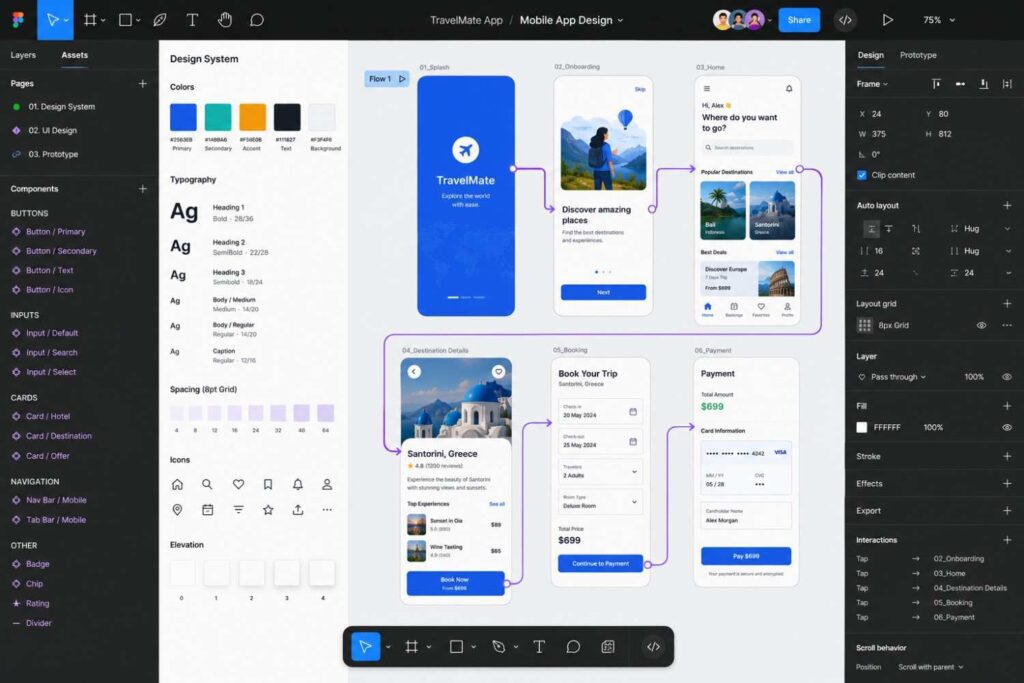
Figma is one of the most popular tools for UI UX design because it is simple, powerful, and collaborative.
Many companies use Figma to design websites, mobile apps, dashboards, and design systems. Therefore, learning Figma increases your job opportunities.
If you are searching for a Figma Course in Delhi or a Figma Course in Janakpuri, choosing a course that includes practical UI UX projects gives you a strong advantage.
Figma Skills You Will Learn
The course includes:
- Creating frames
- Auto Layout
- Components
- Variants
- Design systems
- Interactive prototypes
- Smart animations
- Team collaboration
- Responsive layouts
- Developer handoff
These features help you build professional-quality designs.
What Projects Will You Build?
Practical projects help you apply every concept you learn.
Instead of practicing only small exercises, you will work on complete UI UX projects. Consequently, you build a portfolio that demonstrates your skills.
Every project also teaches you how to think like a professional designer.
Sample Projects
You may design:
- Restaurant website
- E-commerce website
- Banking app
- Food delivery app
- Fitness app
- Travel booking app
- Hospital website
- Learning platform
- Business dashboard
- Portfolio website
These projects help you gain practical experience before applying for jobs.
Can You Become a Freelance UI UX Designer?
Yes. Many designers work as freelancers after building a strong portfolio.
Freelancing allows you to work with startups, agencies, and businesses from different industries. Moreover, you can choose projects based on your interests and schedule.
However, success depends on your design quality, communication skills, and consistency.
Freelance Services You Can Offer
You can provide services such as:
- Website UI design
- Mobile app design
- Landing page design
- Dashboard design
- Wireframing
- Prototyping
- Design systems
- UI redesign
- UX improvements
- Figma file creation
As your portfolio grows, you can work with larger clients and more challenging projects.
What Career Opportunities Are Available?
A UI UX Design Course opens the door to many creative career options.
Today, businesses of every size need designers who can create user-friendly digital products. Therefore, skilled UI UX designers are in demand across startups, software companies, agencies, and large organizations.
Popular Job Roles
After completing the course, you can apply for roles such as:
- UI Designer
- UX Designer
- UI UX Designer
- Product Designer
- Interaction Designer
- Visual Designer
- Web Designer
- Mobile App Designer
- Figma Designer
- Design Consultant
Many professionals also combine UI UX design with front-end development or digital marketing to expand their career opportunities.
Why Choose GICT for a UI UX Design Course in Delhi?
GICT focuses on practical learning that prepares students for real design projects.
Every module combines theory with hands-on practice. Therefore, students learn by designing websites, mobile apps, and interactive prototypes instead of only watching demonstrations.
The course also includes Figma training, portfolio development, and career guidance so that learners are ready for the industry’s current requirements.
Why Students Choose GICT
Students benefit from:
- Experienced trainers
- Practical classroom sessions
- Live design projects
- Individual feedback
- Figma training
- Portfolio development
- Industry-focused curriculum
- Interview preparation
- Flexible class timings
- Career guidance
If you are looking for a UI UX Design Course in Delhi or a UI UX Design Course in Janakpuri, GICT provides practical training that helps you become a confident UI UX designer.
How Much Can a UI UX Designer Earn?
A UI UX designer can earn a competitive salary because skilled designers are in demand across many industries.
Your income depends on your skills, portfolio, experience, and the type of company you work for. Therefore, focus on building practical skills instead of thinking only about salary.
Freelancers can also increase their earnings by working with multiple clients and completing different types of design projects.
Factors That Affect Your Career
Your growth depends on:
- Design skills
- Portfolio quality
- Figma knowledge
- UX understanding
- Communication skills
- Problem-solving ability
- Project experience
- Continuous learning
Strong practical skills usually create better career opportunities.
How Do You Choose the Right UI UX Design Course?
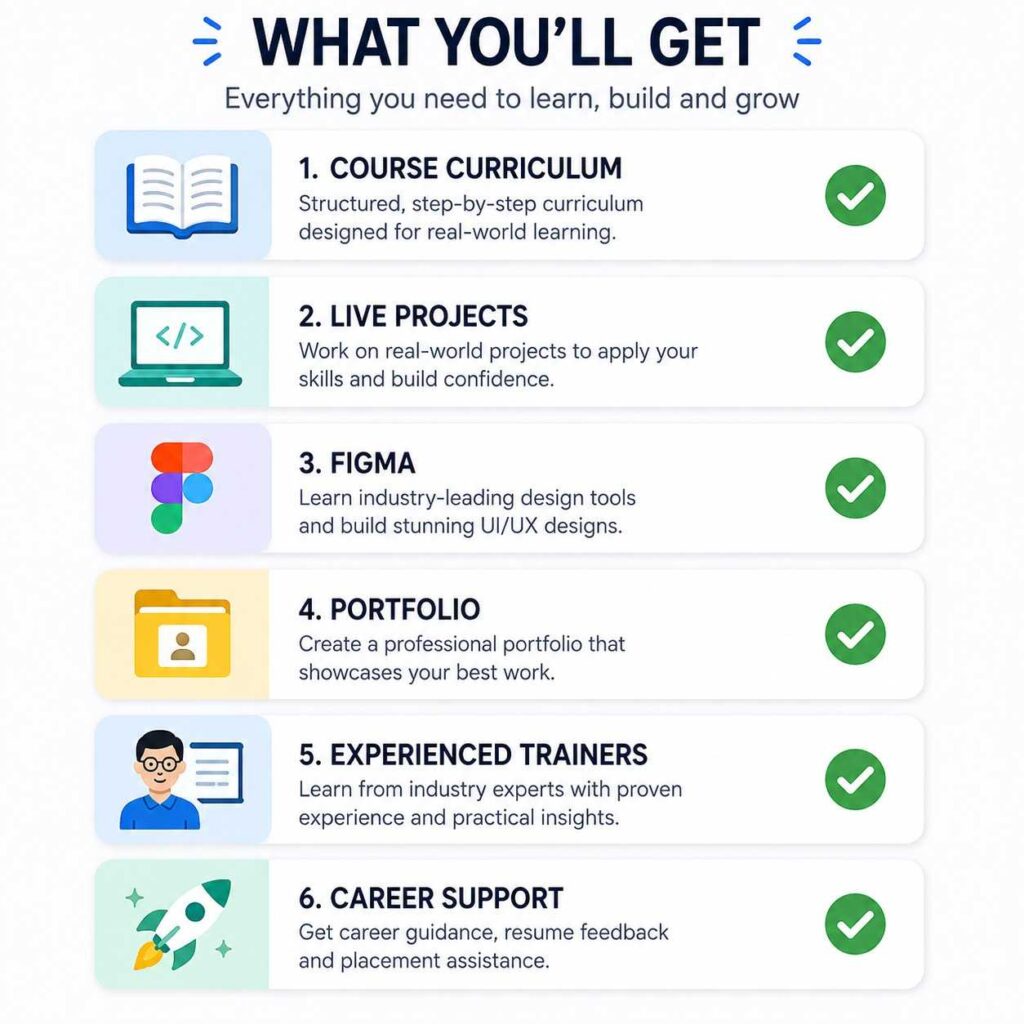
The right UI UX Design Course should provide practical learning, real projects, and guidance from experienced trainers.
Many courses teach only software. However, software alone is not enough. A complete course should also teach design thinking, user research, wireframing, prototyping, and portfolio development.
Before joining any institute, compare the curriculum and practical training offered.
What Should a Good Course Include?
Choose a course that offers:
- Practical assignments
- Figma training
- UI design fundamentals
- UX design principles
- User research
- Wireframing
- Interactive prototyping
- Responsive design
- Portfolio development
- Career guidance
A structured course helps you become job-ready with confidence.
Why Is Practical Training Important?
Practical training helps you apply design concepts to real projects.
Watching videos and reading theory can build basic knowledge. However, designing websites and mobile apps yourself is the best way to improve.
Every project teaches you something new. You learn how to solve design problems, receive feedback, and improve your work step by step.
As a result, your confidence grows, and your portfolio becomes stronger.
Why Is a Portfolio Important?
A portfolio shows employers what you can design.
Most companies want to see your practical work before hiring you. Therefore, a strong portfolio is often more valuable than simply listing software skills.
Throughout the course, you create projects that demonstrate your understanding of UI, UX, and Figma.
Your Portfolio May Include
- Mobile app designs
- Website designs
- Landing pages
- Dashboards
- Wireframes
- Interactive prototypes
- Design systems
- Case studies
A well-organized portfolio helps you stand out during interviews.
Will You Receive a Certificate?
Yes. After successfully completing the course, you receive a course completion certificate.
A certificate demonstrates that you have completed structured training. However, employers also evaluate your portfolio, design thinking, and practical skills.
Therefore, continue improving your projects even after the course ends.
Why Choose GICT for a UI UX Design Course in Delhi?
Choosing the right institute can make your learning journey smoother and more effective.
At GICT, students learn through practical projects instead of only studying theory. Every module focuses on solving real design problems while improving creative thinking.
Students also receive guidance on Figma, user research, prototyping, and portfolio creation. Consequently, they develop the skills employers expect from modern UI UX designers.
What You Get at GICT
- Classroom-based practical training
- Experienced trainers
- Live UI UX projects
- Figma training
- Portfolio development
- Individual feedback
- Interview preparation
- Career guidance
- Flexible class timings
- Course completion certificate
If you are looking for a UI UX Design Course in Delhi, GICT provides practical learning that prepares you for real industry projects.
Ready to Start Your UI UX Design Journey?
Join GICT’s UI UX Design Course in Delhi and learn how to design modern websites and mobile apps using industry-standard methods and Figma. Build practical skills through live projects, create a professional portfolio, and prepare for careers in UI UX design.
If you are searching for a UI UX Design Course in Janakpuri or a Figma Course in Delhi, contact GICT today to learn more about upcoming batches and start building your future in UI UX design.
Final Thoughts
A UI UX Design Course Near Me helps you learn how to create websites and mobile apps that are attractive, easy to use, and focused on user needs. As businesses continue to build digital products, the demand for skilled UI UX designers continues to grow.
Learning through a structured course gives you a clear path from the basics to advanced design concepts. You also gain practical experience through projects, feedback, and portfolio development.
If you are looking for a UI UX Design Course in Delhi or a UI UX Design Course in Janakpuri, GICT offers classroom training that combines UI design, UX design, and Figma with hands-on practice. The course helps students, beginners, graduates, and working professionals build skills that are useful in today’s digital industry.
Whether you want to become a UI UX designer, work as a freelancer, or improve your design skills, this course provides the knowledge and practical experience needed to begin your journey with confidence.
Frequently Asked Questions
Yes. The course starts with the basics and gradually introduces advanced UI UX concepts.
No. Beginners can join because the course teaches every concept step by step.
Yes. Figma is one of the main tools used throughout the course for designing websites, mobile apps, and prototypes.
No. UI UX designers mainly focus on research, layouts, visual design, and user experience. Basic knowledge of HTML and CSS can be helpful, but coding is not required to start learning UI UX design.
Yes. Many UI UX designers work as freelancers after building a strong portfolio and gaining practical experience.
If you are searching for a UI UX Design Course Near Me, GICT offers classroom-based training in Janakpuri, Delhi. The course includes UI design, UX design, Figma, wireframing, prototyping, and portfolio development to help students become job-ready.